Wolfoo 2048
Wolfoo 2048
Wolfoo 2048
Wolfoo 2048

Wolfoo 2048 · Sconnect · GameMonetize

Wolfoo 2048: Choose a column, build to 2048

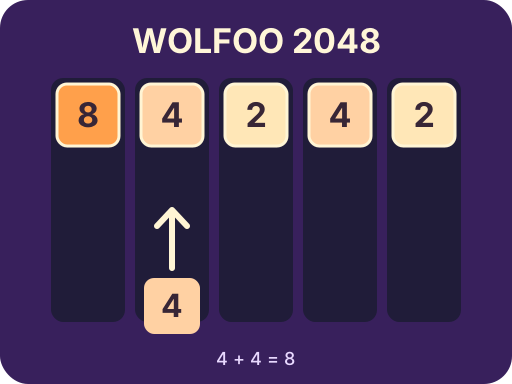
In Wolfoo 2048, selecting one of five columns launches a numbered tile from the bottom. Tiles stack at the top, so imagine the new tile joining the exposed end of a stack, not falling onto its base. Two 4s in the same column can merge into an 8. Read the current value and the smaller next-tile preview before choosing a lane. If neither makes an immediate match, start a new stack where it won't block a useful number. An open column gives you somewhere to send a tile that doesn't fit your plan. Work toward 2048 by doubling tiles and preserving room for future matches. Undo, Swap and Hammer give you ways to reconsider a move, change the current tile or remove a tile when the board becomes awkward.
How to Play Wolfoo 2048? 📔

  • Start a round

    Choose Play inside the game. If a pre-roll appears, wait or use Skip when the player offers it.
  • Pick a column

    Click or tap one of the five lanes to launch the current number upward.
  • Double a value

    When the exposed tile matches the incoming number, send them together. For example, two 4s make an 8.
  • Plan two tiles ahead

    Check the next preview before you place the current tile. Keep a spare lane if both numbers lack a match.

FAQs ❓

Is this the classic sliding board?

Which direction do tiles move?

Can I refill a tool?

Does the game follow the page language?

Why Play Wolfoo 2048? 🏆

Watch the exposed value

A number farther up a stack is not as easy to reach as the one at its open end.

Protect your options

Split incompatible values between columns rather than filling a single lane with every awkward tile.

Use tools with a purpose

Undo takes back a move, Swap changes the pending number and Hammer clears a selected tile.